Updated for 2026
The quick version: For a short trip, buy a travel eSIM before you fly. It is the easiest option and lets you use maps and WhatsApp as soon as you land. For a longer stay, a Colombian prepaid SIM or local eSIM is usually cheaper and gives you a local phone number. If you plan to spend time outside the big cities, Claro is generally the safest choice for coverage.
Getting connected in Colombia is not difficult, but the number of options makes it look more complicated than it is. Most visitors only need to make one decision: do you want the easiest setup, or the lowest long-term cost?
I have lived in Medellín since 2018, and my advice is simple. Do not spend your first afternoon walking around shopping malls comparing phone plans. Set up a small eSIM before the flight, make sure WhatsApp works, and deal with a local line later only if you actually need one.
This guide explains the differences, the likely costs and the small setup details that can save you a lot of frustration after arrival.
Table of Contents
Which option should you choose?
| Your trip | Best option | Why |
| A few days to two weeks | Travel eSIM | Fast setup, no store visit and data from the moment you land. |
| Two to four weeks | Travel eSIM or local prepaid line | Choose convenience or lower cost depending on how much data you use. |
| One month or longer | Colombian prepaid SIM or eSIM | Cheaper data and a local number for bookings, deliveries and calls. |
| Rural travel or road trips | Local Claro line | Usually the safest bet once you leave the main cities. |
| Phone without eSIM support | Physical prepaid SIM | Buy from an official carrier shop and test it before leaving. |
My recommendation for most visitors
Buy a modest travel eSIM before departure. Install it while you still have reliable Wi-Fi, but do not activate it too early if the plan starts counting days immediately. When you arrive, switch the eSIM on, select it for mobile data and keep your normal number active only for messages or verification codes.
That setup is enough for maps, WhatsApp, transport apps, restaurant bookings and normal social-media use. If you later decide that you need more data or a Colombian number, you can buy a local prepaid line without any pressure.
For a longer stay, I would normally move to a local line. Colombian prepaid data is inexpensive, and a local number can be useful for apartment deliveries, doctors, banks, tour operators and smaller businesses.
Before buying anything, check your phone
Two things matter: your phone must be unlocked, and it must support the type of SIM you want to use.
Unlocked phone: A phone tied to your home carrier may reject another company’s SIM or eSIM.
eSIM support: Dial *#06#. If the screen shows an EID number, the phone normally supports eSIM.
Dual-SIM support: This lets you keep your home number active while using a Colombian or travel plan for data.
Battery and updates: Install software updates before travelling. Changing mobile settings is much easier before you are standing in an airport arrivals hall.
Do not assume every version of the same phone supports eSIM. Some models sold in certain countries have different hardware. Check the exact model number rather than only the product name.
Option 1: A travel eSIM
A travel eSIM is a digital data plan sold for international use. You buy it online, scan a QR code or install it through an app, and your phone connects to a Colombian network after arrival.
This is the easiest choice for a normal holiday. There is no plastic card, no queue, and usually no need to show your passport. You can leave the airport with working maps instead of searching for a phone shop while tired and carrying luggage.
The main advantages
You can buy and install it before the trip.
You keep your physical SIM slot free.
It is easy to top up or add another plan online.
You can keep your usual WhatsApp account and contacts.
The main drawbacks
Most travel eSIMs provide data only, without a Colombian phone number.
They usually cost more per gigabyte than a local prepaid plan.
The provider may route traffic through another country, which can slightly increase delay.
“Unlimited” plans may reduce speed after heavy use or restrict hotspot use.
How to compare travel eSIM providers
Airalo, Saily, Nomad, Holafly and several other companies sell Colombia plans. The brand matters less than the details of the actual package. Before paying, check the following:
Which Colombian network the plan uses. A plan on Claro may be more useful for rural travel, while Movistar or Tigo can work perfectly well in Medellín and other large cities.
Whether hotspot or tethering is allowed. This matters if you work from a laptop.
When the validity period begins. Some plans start when installed; others start when they first connect in Colombia.
Whether the plan is fixed-data or “unlimited.” Read the fair-use rules rather than trusting the headline.
Whether the provider offers live support. A cheap plan is not much help if it fails and nobody answers.
For most travellers, a medium-sized fixed-data plan is better value than an expensive unlimited package. Maps and WhatsApp use little data. Video, automatic photo backups and scrolling through social media use far more.
Option 2: A Colombian prepaid SIM or eSIM
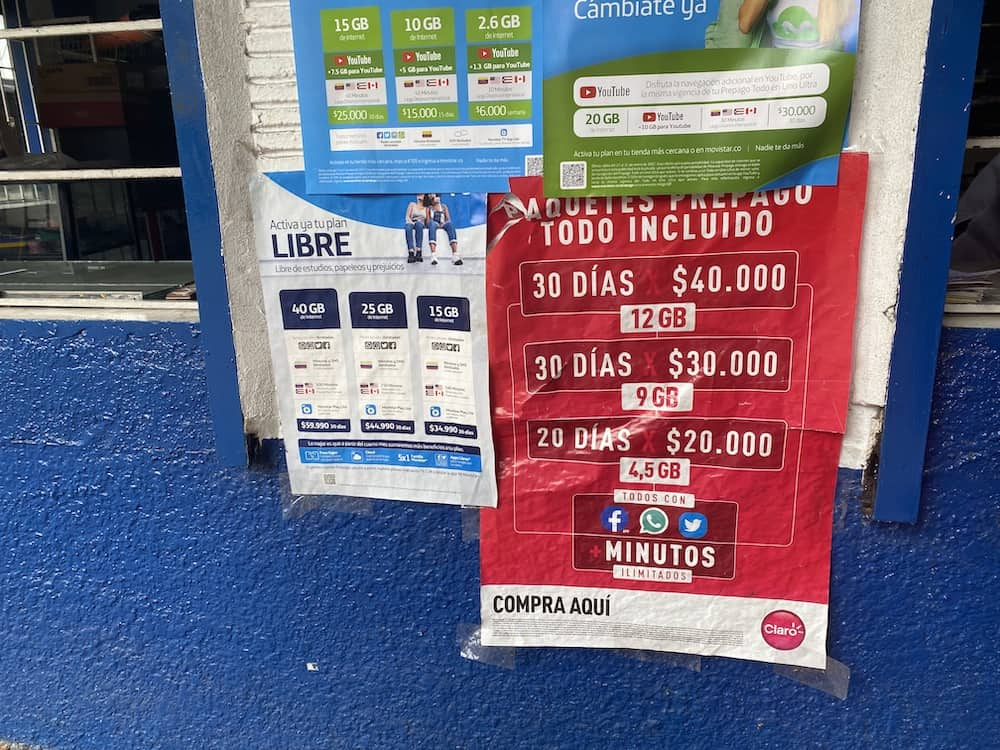
A local prepaid line is usually the best value for a longer stay. It gives you Colombian data, calls and a local number. You can add credit, called a recarga, and then activate a package for a set number of days.
The process is more involved than buying a travel eSIM. An official shop will ask for identification, normally your passport, and the line must be registered correctly. Buy from a proper Claro, Movistar or Tigo store rather than a random street kiosk. The difference in price is rarely worth the risk of leaving with a line that stops working later.
Local eSIMs are also becoming easier to buy. Tigo and Movistar advertise prepaid eSIM options, while Claro supports eSIM on compatible phones. The exact process varies. Some products can be ordered online, while others still require help from a store or an existing customer account.
Which Colombian network is best?
| Network | Best for | What to know |
| Claro | Rural travel and broad coverage | Usually my first choice if the trip includes small towns, countryside or long road journeys. |
| Movistar | Cities and competitive prepaid packages | Works well in Medellín and other large cities. Check rural coverage for your route. |
| Tigo | City use and straightforward prepaid options | Strong in urban areas and offers prepaid eSIM products. |
| WOM and smaller providers | Low prices | Can be good value, but coverage may be less reliable outside major urban areas. |
No carrier is perfect in every building or neighborhood. Medellín sits in a valley surrounded by mountains, and signal can change inside high-rise apartments, underground parking areas and hillside neighborhoods. Ask your host which network works best in the building if you plan to stay for several months.
What should it cost?
Prices change constantly, so treat any exact figure online as a snapshot rather than a promise. As a rough 2026 guide:
| Option | Typical cost | Notes |
| Small travel eSIM | About US$5–10 | Enough for light maps, messages and bookings on a short trip. |
| Larger travel eSIM | About US$20–40 | Better for regular social media, work or a longer trip. |
| Unlimited travel eSIM | Often US$50 or more | Check speed limits and hotspot rules carefully. |
| Local prepaid package | Often COP 7,000–25,000 | The amount of data and validity period vary by carrier. |
| Physical SIM or local eSIM setup | Usually inexpensive | The store may include activation in the first package. |
Airport options are convenient but are not always the cheapest. For a short trip, the difference may be worth paying. For a longer stay, wait until you reach the city and visit an official store in a shopping mall.
Where to buy a local SIM in Medellín
The easiest places are official carrier stores inside major shopping centers such as Santafé, Oviedo, Premium Plaza, Los Molinos and Viva Envigado. Store locations change, so check the carrier’s website or maps before making a special journey.
Bring your passport and the phone you plan to use. Ask for a línea prepago. Tell the employee how long you are staying and whether you need a physical SIM or eSIM. Before leaving the shop, test mobile data, make a call if the package includes minutes and confirm your Colombian phone number.
Useful Spanish: “Quiero una línea prepago con datos. ¿La pueden registrar con mi pasaporte?”
How to install a travel eSIM
1. Buy the plan on Wi-Fi — Use the provider’s website or app and save the confirmation email and QR code.
2. Install it before travelling — Do this at home unless the provider clearly says installation immediately starts the validity period.
3. Give the line a clear name — Call it “Colombia data” so you do not confuse it with your normal number.
4. Select it for mobile data — Keep your home SIM as the voice line if you still need incoming calls or verification messages.
5. Turn on data roaming for the travel eSIM — Most international eSIMs need roaming enabled because they connect through a partner network.
6. Turn off mobile-data switching — This helps prevent your phone from quietly using expensive roaming on your home SIM.
7. Restart or use airplane mode — If the eSIM does not connect after landing, a quick network reset often fixes it.
How to set up a local prepaid line
1. Use an official store — Take your passport and unlocked phone.
2. Ask for prepaid service — You do not need a monthly contract for a normal visit.
3. Choose a package — Start small. You can always add another package later through the carrier app, website, supermarket or payment service.
4. Make sure the line is registered — Ask the employee to confirm your name, passport and device details are correct.
5. Test everything in the shop — Open a website, send a WhatsApp message and write down your local number before leaving.
Do you need to register your phone’s IMEI?
This mainly matters when you use a Colombian mobile line in a phone brought from abroad. Colombia keeps a national database of phone identification numbers, known as IMEIs. A phone that remains unregistered after the operator requests registration can eventually be blocked from local networks.
The shop should guide you through the process when activating a local SIM or eSIM. Keep proof that the phone belongs to you, and find the IMEI by dialing *#06#. If the carrier sends a registration warning, do not ignore it.
A normal international travel eSIM works through roaming and generally does not create the same problem. The issue is mainly relevant when activating a Colombian number.
Keep your normal WhatsApp number
WhatsApp is more important in Colombia than normal phone calls. Hotels, drivers, restaurants, landlords, doctors and tour operators all use it.
You do not need to change your WhatsApp number when you insert a Colombian SIM. If WhatsApp asks whether you want to use the new number, choose to keep your existing account unless you have a specific reason to switch. Your chats and contacts will continue working through the new data connection.
A Colombian phone number is still useful for some deliveries, bookings and local services, but most travellers can manage without one.
Mobile coverage, 4G and 5G
In Medellín, Bogotá, Cartagena and Colombia’s other major cities, 4G is normally fast enough for video calls, navigation and everyday work. 5G is available in parts of the larger cities, but coverage still changes by carrier, phone and neighborhood. I would not choose a plan only because it advertises 5G.
The weak spots are more predictable outside the cities: remote mountain roads, national parks, parts of the Pacific coast, the Amazon and isolated rural areas. Download offline maps before long journeys and save important addresses as screenshots. Even the best network can disappear between towns.
Wi-Fi in Medellín
Hotels, hostels, cafés, malls and coworking spaces usually provide free Wi-Fi. For normal tourism, you could survive on Wi-Fi alone, but I would not recommend it. A small mobile-data plan makes transport, directions and last-minute communication much easier.
For remote work, do not trust an apartment listing that only says “high-speed internet.” Ask for a recent speed-test screenshot, check whether the router is inside the apartment, and confirm what happens during an outage. A phone hotspot is a useful backup, which is another reason to check whether your eSIM allows tethering.
Avoid accidental roaming charges
Choose the Colombian or travel eSIM as the only line allowed to use mobile data.
Turn off data roaming on your home SIM.
Disable automatic mobile-data switching between lines.
Turn off cloud photo backups and automatic app updates unless you have a large plan.
Check your home carrier’s roaming rules before leaving. Some daily roaming passes activate after only a small amount of background data.
What to do if the eSIM does not work
Connect to Wi-Fi and check that the eSIM appears as an active mobile line.
Make sure it is selected for cellular data.
Enable data roaming for the travel eSIM.
Switch airplane mode on for 20 seconds, then turn it off.
Restart the phone.
Check the provider’s APN instructions. Some plans need a specific APN entered manually.
Contact support before deleting the eSIM. Many QR codes can only be installed once.
Frequently asked questions
Is eSIM available in Colombia?
Yes. International travel providers cover Colombia, and local carriers including Claro, Movistar and Tigo support eSIM on compatible devices. The buying process differs by company.
Do I need a Colombian phone number?
Not for most short trips. WhatsApp, maps and transport apps work with a data-only eSIM. A local number becomes more useful for longer stays, deliveries and services that send Colombian text messages.
Which carrier has the best coverage?
Claro is generally the safest all-round choice, especially for rural travel. In Medellín and other large cities, Movistar and Tigo also work well in most areas.
Can I keep my usual WhatsApp account?
Yes. Keep your existing WhatsApp number and use the new SIM or eSIM only for data.
Should I buy a SIM at Medellín airport?
You can, and it is convenient. It may cost more or offer fewer choices than an official store in the city. A travel eSIM removes the need to decide while tired after a flight.
Can I use my eSIM as a hotspot?
Often, but not always. Check the plan conditions before buying, especially with unlimited packages.
Is public Wi-Fi safe?
Use normal caution. Avoid sensitive banking or account changes on an unknown network, and use mobile data or a trusted VPN when possible.
Will my phone work in Colombia?
Most recent unlocked phones will work. Check eSIM compatibility, supported network bands and whether the exact model is accepted on Colombian networks if you plan to use a local line for a long period.
The bottom line
For most visitors, a travel eSIM is the least stressful option. Install it before the flight, keep your usual WhatsApp number and arrive with working maps. It may not be the absolute cheapest solution, but the difference is small on a short trip.
For a longer stay, buy a Colombian prepaid line from an official store. You will pay less for data and gain a local number. If the trip includes small towns or a lot of countryside, I would lean toward Claro.
Whatever you choose, download offline maps before leaving the city and do not wait until your phone has no signal to learn how the plan works.